Dashboard Overview
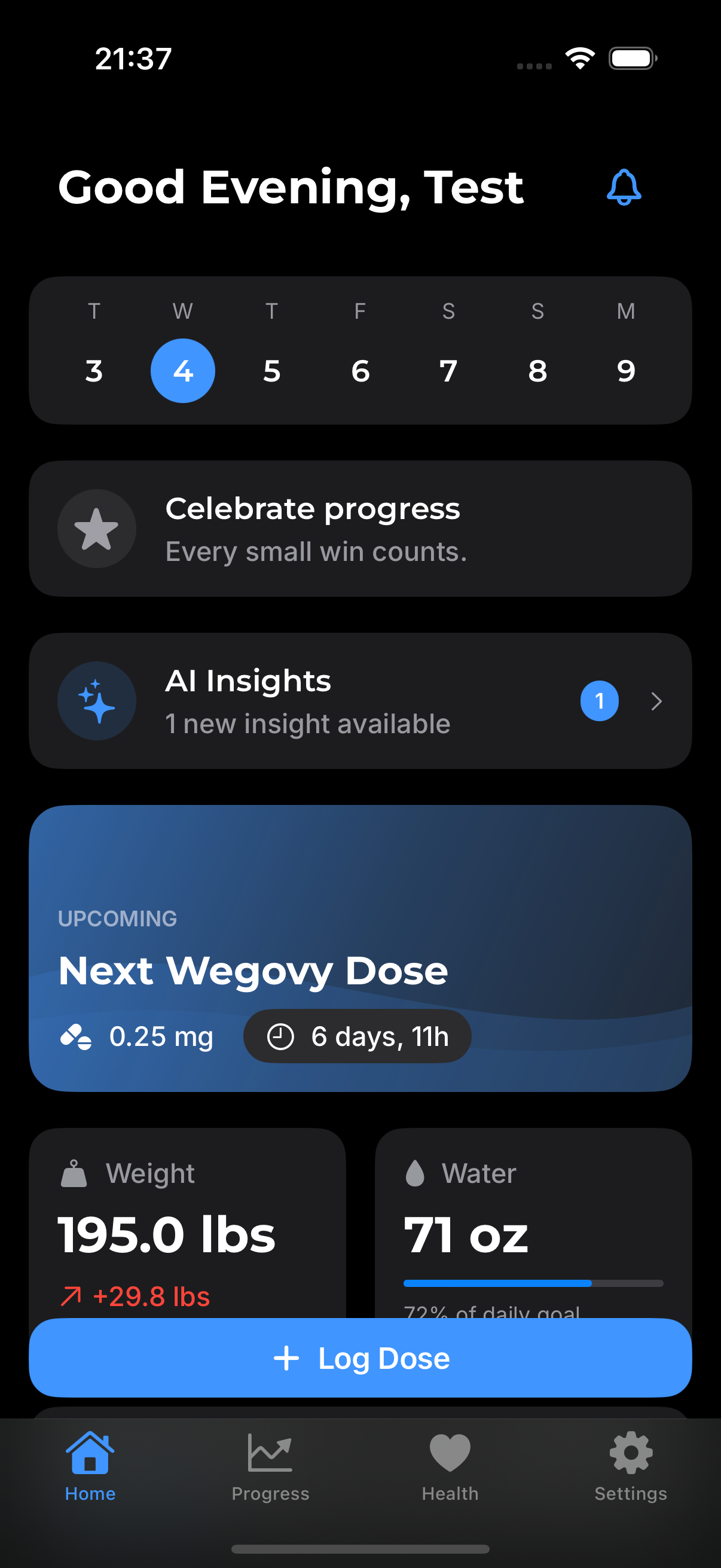
The dashboard is your home base in GLPea. It shows everything you need at a glance: when your next dose is due, your recent metrics, and quick actions for common tasks.
What You'll See
Next Dose Countdown
The large countdown at the top shows days, hours, and minutes until your next injection. The visual indicator changes color as injection day approaches:
- Green - More than 2 days away
- Yellow - 1-2 days away
- Red - Injection day or overdue
Learn more about the countdown →
Current Protocol
Below the countdown, you'll see:
- Medication name (e.g., Ozempic, Mounjaro)
- Current dose (e.g., 0.5mg)
- Injection day (e.g., Fridays)
Tap this section to view or edit your protocol.
Quick Stats
A row of cards shows your recent metrics:
- Weight - Your latest logged weight
- Water - Today's water intake
- Streak - How many consecutive weeks you've logged doses
Recent Activity
Below the stats, you'll see recent logs:
- Doses you've taken
- Weight measurements
- Water intake logs
- Symptoms you've tracked
Quick Actions
The bottom of the dashboard has buttons for common tasks:
| Button | Action |
|---|---|
| Log Dose | Record a new injection |
| Add Weight | Log a weight measurement |
| Add Water | Track water intake |
| Check-In | Log symptoms and how you're feeling |
Navigation
From the dashboard, access other parts of the app:
- History (clock icon) - View all your past logs
- Progress (chart icon) - See charts and trends
- Settings (gear icon) - Adjust your preferences
Dashboard Tips
Morning Routine
Many users check their dashboard each morning to see their countdown and log their weight while it's consistent.
Injection Day
On injection day, the dashboard prominently displays a reminder. After you inject, tap "Log Dose" immediately so you don't forget.